Showing posts with label Android. Show all posts

Samsung has permanently halted production and sales of its Galaxy Note 7 smartphone

 The loss of one of its flagship smartphones is a major embarrassment for Samsung (SSNLF), which was forced to recall 2.5 million Note 7s shortly after the device went on sale in August.

The South Korean firm attempted to fix the problem by switching battery suppliers and updating the smartphone's software. Company executives issued a slew of apologies.

But when replacement phones were issued, a number of customers reported that those devices also caught fire, including one aboard a passenger jet.

Samsung on Monday advised all customers to stop using the phones, sending its shares tumbling by 8% in Seoul. The world's biggest smartphone maker said Tuesday it was killing off the phone entirely.
 The Note 7 was a premium device that sold for at least $850 in the United States. It received strong reviews from critics, who heralded it as sleek and powerful. But customer excitement soon evaporated as safety concerns grew.

Samsung was panned for its response to the crisis -- many customers were confused over whether their phone was safe, whether it should be returned and whether the electronics giant was offering a replacement.

Samsung told customers in South Korea on Tuesday that they will be able to exchange their Note 7 for another smartphone. The exchange program will begin on Thursday and run through the end of the year.

It was not immediately clear what customers in other markets could expect in terms of a replacement or compensation.
 Giving up on the Note 7 will be costly. Analysts at Nomura estimate the total hit could reach $9.5 billion in lost sales and wipe out $5.1 billion of profit.

But Samsung, which has a market value of about $194 billion and annual sales of $179 billion, should be big and profitable enough to weather the loss of one model.

How to root Samsung Galaxy J7

If you own Samsung Galaxy J7, there is every reason to root it. Once you root Samsung Galaxy J7 , you can get a lot more out of your phone. For example, you can increase battery life, improve system speed and even change the way your core Android system looks. Although this rooting won’t change Samsung Galaxy J7 specification, it would improve its overall performance a great deal.
Why use this rooting technique?

Rooting Samsung J7 is easy, especially if you have already rooted Samsung Galaxy J5. It’s essentially the same rooting procedure with a few twists and tricks. This is kind of a universal rooting technique for J7 as you can use it on any firmware. There are plenty of other reasons to use this technique.

  •     You can use it to root Samsung Galaxy J7 running any firmware. So every time you upgrade your firmware or install a custom ROM, you can come back to this method and root your device again. You don’t have to look for a new method every time. I suggest you bookmark it if you plan to play around with your device.
  •     It’s an easy procedure. There are no risks if you follow along with care. It’s true that rooting will void your warranty but I’m sure you have already thought about it if you have decided to root Samsung Galaxy J7.
  •     You can unroot your phone at any time if you use this rooting method. I will give you guys an unrooting tutorial as soon as I get back to J7. For now, I’m going back to my Infinix devices and giving you some more tutorials on new upgrades that just got here.
 How to root Samsung Galaxy J7 – Summary

To root your phone, you simply need to flash a custom recovery image and then run the root exploit. The root exploit you will use in this method is CF Auto Root.  Once you root your phone, you can always unroot it later to take advantage of OTA updates.For this tutorial to work, you will first need to install a custom recovery image. You can easily install TWRP recovery on any Samsung phone.
How to root Samsung Galaxy J7 – Step by step procedure

Step 1

Download CF Auto Root. You will need this root exploit to root Samsung Galaxy J7. Once you have downloaded the file, move it to your desktop.

Step 2

Connect your device with your PC. Use a USB cable to establish a connection.

Once the connection is established, move CF Auto Root zip file to your device. Don’t unzip this file.

Step 3

Now you are going to start flashing your phone so make sure it is charged above 50%. You don’t want to brick your phone only because you forgot to charge it before flashing it.

Restart your phone and go to recovery mode. Remember, this tutorial assumes that you have already installed TWRP or another custom recovery on your phone.


Once you see the recovery menu, go to ‘install’. It will ask you to provide path to the file. Browse to the CF Auto Root zip file. Now start the flashing process and wait.

Once your device is flashed with CF Auto Root, reboot it. It should be rooted now

Step 4

In case your phone doesn’t come out of a boot loop after you flash CF Auto root, you need to wipe data and reset phone to factory settings from recovery. Additionally, you may have to wipe cache as well to get out of boot loop.

Repeat the procedure from step 1. Hopefully, there will be no boot loop this time.

5 Android apps you shouldn’t miss this week

1.Samsung’s Milk Music was finally put to rest this last week. As of September 22nd, the service is no longer available for download or use. It shouldn’t surprise anyone because this was announced a couple of months ago. Prior Milk Music users will get a 14-day free trial for Slacker Radio since that was the service that powered Milk Music. It’s still available in China and South Korea for now, but it won’t last forever there either.

 2.A study was released late last week that showed that 13% of all users downloaded 50% of all apps. That makes a lot of sense because us early adopters can and will frolic from one app to the next to see if it’s any good. Another interesting stat is that 49% of people surveyed for this study didn’t download a single app during the survey period. On average, people interested in apps download about 3.5 per month.

 3. Google is formally rolling out AMP, or accelerated mobile pages, to everyone all around the world starting this week. For those who don’t know, AMP is a project to help pages load much more quickly and take up far less data than their non-AMP counterparts. Google boasts that they’ve done up 600 million AMP sites in 232 regions. The only other thing of note is that this won’t change the search results at all so you’ll still see the same searches.

 4. Yahoo sent out an email this week to tell everyone about a data leak all the way from 2014. On top of being massively late, Yahoo also revealed that they believe the culprit behind the hacks was a “state sponsored actor” and that it was more than just account passwords that got taken. They didn’t mention which state or country the attack originated in, but there are really only a handful that target US based companies like Yahoo anyway. Of course, that also doesn’t explain why it took them two years to tell us anyway.

   5. The latest Humble Bundle is now live! This time around the bundle is based around Artifex Mundi games for both PC and mobile. You can pay whatever you want and get three games, beat the average and get six total games, or pay more than $5 and get every game in the bundle. There are some good titles here and it’s also a great way to donate to charity and play some games at the same time.

Allo: Everything you need to know

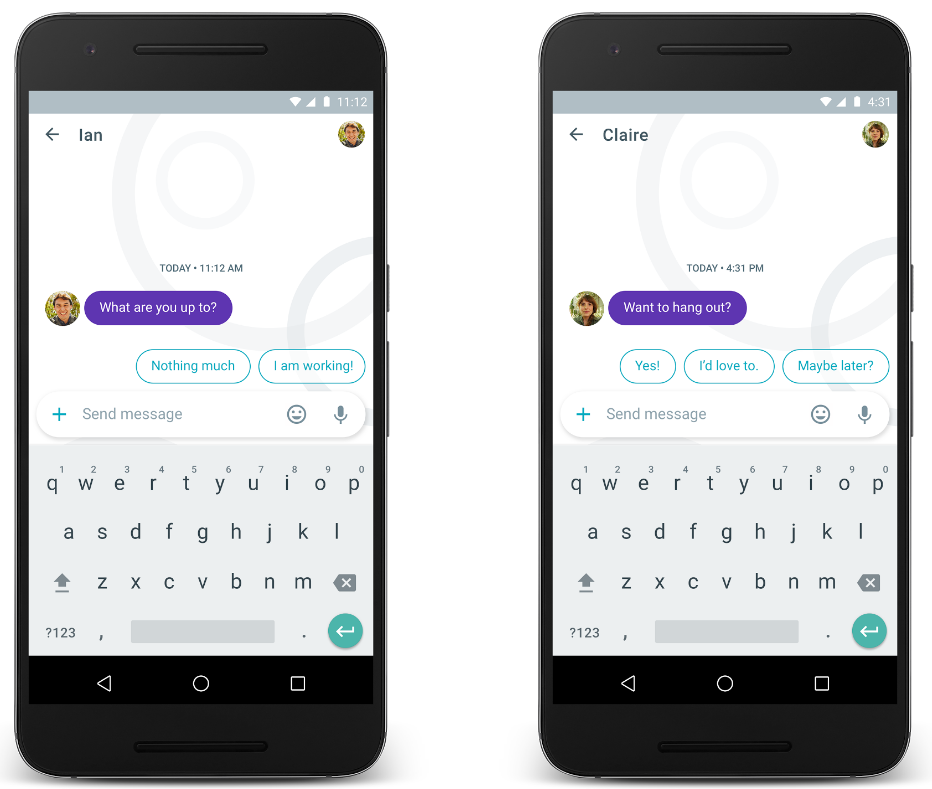
Allo is finally available, and it offers a first look at what's possible with Google Assistant. Assistant is Google's AI chatbot that answers questions by drawing on the vast trove of information it has collected over the years. It suggests replies in conversations, offers recommendations on nearby points of interest, tells bad jokes, plays games with you, and so on. Unlike Google Now, interacting with Google Assistant feels more personal and conversational.

If you're just getting started with Google's latest messaging service, we've got you covered.

Setting up Allo

Haven't gotten around to downloading Allo just yet? Here's the Play Store link. Once you're done downloading the app, it's a straightforward process to register using your phone number. We've covered the basics of getting started with the app below:

How to install and set up Allo

Allo and text messages

First off, Allo isn't a Hangouts replacement. You can't set the messaging service as the default SMS client on your phone. It does offer the ability to message a contact that doesn't have Allo installed through Play Services, but that's about it. You can also talk to contacts over SMS, with the message itself routed through Google's servers, but Allo isn't an SMS service by design. In this regard, it has more similarities to WhatsApp than iMessage.

Allo is mobile-first, which means that right now, there's no way to access it over the web. It requires your phone number to register, and you can only use it on one device at a time. Google will add more functionality to the app over time, but for now, Allo is in the proverbial beta stage that we've come to expect from many Google services.

Here's how Allo handles text messages
Here's what you need to know about Allo and phone numbers
All the features of Allo

Allo is loaded with functionality that differentiates it from the slew of messaging services available today. First up is Google Assistant, which offers contextual information within chats, reply suggestions, emoji parties, and much more. Assistant is always running in the background, and is there to assist when needed. Sharing a picture of food? It'll ask if you want to take a look at restaurants nearby. Interested in going out? It'll offer a list of nearby attractions, events, and movies right there in the chat window.

The messaging service also offers an incognito mode for private chats, and you can choose from a variety of stickers for when words just aren't enough.

These are the top Allo features you need to know

Traveling with Allo

Allo is tied to your main phone number, but you can switch your SIM card out while traveling and continue to use the service without any issues. As long as you don't active Allo on another device with the same number, you'll be able to access the service.

Here's how SIM card switching works in Allo

Should you use Allo?

Allo is just getting off the ground, and as such there are several features missing from it. Even though it's tied to your Google account, chats are stored locally, and don't make their way across when you switch to a new device. That, and the lack of a desktop client, are the biggest drawbacks for me, but these issues should (hopefully) be fixed shortly. For context, WhatsApp didn't have a chat backup feature for years. I remember transferring WhatsApp conversations in text format to my email to preserve them when switching devices.

Overall though, Google may have missed a beat by not bundling Duo into Allo. Video calling is the one feature that isn't available on WhatsApp or Messenger, and if Google managed to bake it into Allo, it would've gotten a decent headstart over its rivals. Google Assistant is great, but it needs a lot of polish before it can be usable every day. While Google works on that, I have the arduous task of convincing my friends and family to switch to Allo.


Samsung Galaxy J7 Prime Launched – Android 6.0.1, 3 GB RAM, Octa Core, 13 MP Camera

Key Features:

Android OS, v6.0.1(Marshmallow).
IPS LCD Capacitive touch screen, 16M Colors.
13 MP rear camera, 8 MP secondary camera.
3 GB RAM.
3300 mAh Battery.
Octa Core processor.
Advantages of Samsung Galaxy J7 Prime:

Samsung Galaxy J7 Prime comes with latest Android OS, v6.0.1(Marshmallow).
Presents 5.5-inch IPS LCD capacitive touchscreen and Multitouch in it
It provides 3 GB RAM.
It encompasses with Octa-core 1.6 GHz Cortex-A53 processor
It is built with Exynos 7870 Octa Chipset.
Brings an internal memory of 32 GB and expandable memory supported with upto 256 GB.
Comes with 13 MP rear camera and 8 MP front facing camera and with additional features like autofocus, LED flash, Geo-tagging, touch focus, face detection, panorama, HDR
Supports Dual SIM features in which both slots are for Micro SIM’s
Its display has stunning pixel density for its resolution (~401 ppi pixel density) which is required.
It has stunning screen-to-body ratio which has approximately ~73.5%, which gives you wide look while watching videos.
Full HD video recording at 1080p@30fps.
Comes with Corning Gorilla Glass 4 protection..
It has stunning battery capacity of 3300 mAh which is good for this range.
Performance is extra-ordinary with no lags
Supports almost all connectives like Wi-Fi, Bluetooth, USB, 3G, 4G.
It comes with additional features like Document viewer, Photo editor/viewer, ANT+ support
Supports sensors like Fingerprint, accelerometer, proximity, compass
Design is impressive and looks stylish
Disadvantages of Samsung Galaxy J7 Prime:

No NFC support.
No Fast Battery Charging feature.
Available only in 2 color variants.
Device looks bit thicker.
SPECIFICATION

Samsung says half of recalled Note 7 already exchangd for new ones

Samsung has made an unofficial commitment that until they have already exchanged those recalled Galaxy Note 7 devices, they will not be selling any new versions of the phablet. Probably that is one of the reasons why they are eager to announce almost every step of the process, apart from the fact that it is also part of their reputation management. Their latest official statement is that almost half of the devices that were voluntarily returned by users in the US have already been replaced with new versions of the Galaxy Note 7.
This means that the Korean OEM has replaced almost 500,000 units of the units that were returned. There are still probably a lot of owners who have not taken advantage of the exchange program for their own safety, thinking that the exploding batteries may have just been isolated incidents. But of course Samsung doesn’t want to take any chances and they have strongly urged owners to recall their phablets and then wait for the replacement units whose batteries have already been changed and software updated.

Samsung also stated in their (very) brief statement that 90% of those that availed of the exchange program still chose to get a new Galaxy Note 7 rather than taking the money and buying a different phone from a different brand. Of course they would have to trumpet that fact as they don’t only stand to lose a lot of money, but also they need to rebuild their reputation as a smartphone maker after this.

We still don’t have an idea on how all of this will affect Samsung’s bottom line. It really is a tough break for the brand as they were just slowly recovering from losses of the past years and had a potential winner in the Galaxy Note 7 since the other flagships for this year, the Galaxy S7 and Galaxy S7 edge, were doing really well in the market.

Tecno Phantom6 Vs Samsung Galaxy Note7


No doubt Samsung is doing all it can to remain the undesputed king of mobile phone manufacturing. The release of Samsung's latest, the Galaxy Note7 is arguably one of the best phablets on the planet.
Galaxy note7 is powered by 4GB ram, 64GB rom etc and is fired up with owesome features that is garanteed to make life enjoyable. However recent spate of battery explosions is threatening the success of the device. With Samsung customers returning their devices in numbers, it becomes imperative to find an alternative. This is were another mobile giant, Tecno comes in. Samsung customers disppointed with note7 can find a good alternative in Phantom6.
Though Tecno's incoming flagship, about to be launched in few days time, no doubt the device will serve as a cool alternative to Samsung's galaxy note7. What do you think

Phantom6 features
     The Tecno Phantom 6 might feature 21- megapixels dual camera with dual LED flash on the back. Meanwhile, selfies are not rolled out, it MIGHT be featuring a 8MP front camera! Note that, the front camera is not yet confirmed. We will keep you updated.

    And for the screen, if the Phantom 6 Plus will be featuring 5.95′
    screen display inches, which is more bigger than the Phantom 5,
    then we’d expect the Tecno Phantom 6 to come with 5.5′ to 5.7′ screen display. Hence, making the screen bigger slighter than
    Phantom 5!
    And maybe or maybe not, the Phantom 6 will be arriving with a
    Iris Scanner and coming to the RAM and Memory. It is expected to
    arrive with a 3GB RAM, 16GB internal storage, expandable up to
    256GB with microSD. That is applications, musics, and many
    other document will last forever on our phone and the slowing
    problem will be erased with the 3GB RAM.


Check Out Whatsapp New Update With Cool Features


WhatsApp Messenger is the most popular messaging platform on all mobile operating systems and if you have a smart phone, then chances are that you will use WhatsApp instead of relying on your actual service provider. Another beta update of version 2.16.270 is here to download in the APK format and the core reason for these beta updates is to provide you with the best experience possible. The developers, this time, did state a list of changes in the changelog, and they have been detailed below.

Voice Mail:If your WhatsApp call is rejected or unanswered, one will now have the option to leave a voice message.
The new feature is basically the voice message feature but only appears when you make a call.
If a contact doesn't pick up or decline a call, all you have to do is hold down on the voice message button, and when you are ready to send the message, just let go the button. You message is sent and it appears in the active WhatsApp conversation with a note saying there's been a missed call.
The report adds that if you slide left when recording you abandon the voice message - but you can't listen back to your recording before deciding to send it.
[b]Bold emojis: [/b]The messaging app has added new features like giving people the ability to send bold, italic and strike-through text in messages, a secret font and Olympic-themed emoji - all within the last few weeks..

1.When sharing or forwarding messages, you can now send to multiple chats at once
2.Chats you frequently contact now appear when forwarding or sharing messages
3.While recording videos, slide your finger up or down to zoom in and out
4.A new front-facing flash helps you capture selfies in the dark

Unfortunately, there still isn’t a video-calling feature present, but it looks like it could come by the end of this year. 


You Can Now Stop Annoying SMS and Calls on MTN & Etisalat With Do-Not-Disturb

Nigeria Mobile network providers have joined telemarketers, scammers, ex-lovers and annoying friends to become “a pain in the neck” to their customers. Making sure that our sleep is disturbed or at most drain our phone battery.

Either you subscribe to the service or not, you are forced to receive at least 3 spontaneous SMS daily. You might have tried some applications to block those annoying SMS, but they still manage to dodge their way into your phone.

I'm pretty sure that this is something you would like to stop from happening any longer, or isn’t it?
MTN and Etisalat Nigeria has introduced a new feature called Do-Not-Disturb (DND) list, which allows you to stop every spontaneous SMS or nonessential campaign messages. The step was taken after the Nigeria Communication Commission, NCC announced it will bang N5 million naira fine against telecommunications for harassing Nigerians with unwanted SMS and Calls.

Now, you have the opportunity to opt-out of any spontaneous SMS, by using the Do-Not-Disturb (DND) list.

To Opt Out of Unwanted SMS From MTN
Simply text HELP to 2442
You will see options to opt-out from any particular sms campaign ranging from educational, health, sport, banking etc...
To Opt Out of Unwanted SMS From Etisalat
Text STOP to 2442
You will see options to opt-out from any particular sms campaign ranging from educational, health, sport, banking etc...

Note that it is absolutely free of charge.
Make sure you reply with the corresponding number from the list.

Be expecting similar thing from other network providers in Nigeria, because they must adhere to the NCC rules if they don't want to pay N5 million naira fine. Thanks to NCC for doing their job properly.

Android 7.0 Nougat Update Jackhammer Android One Smartphones

The much-anticipated Android 7.0 (Nougat) has been rolled out (Over-The-Air update) and the Nexus 6P finally received the Android 7.0 update a few days back, after it's been on hold since the release of the new OS due to some issues with battery and performance.
We heard that the Cherry Mobile G1 which is already run on Android one, is one of the first device to receive the Nougat update, but other Android One phones are likely to get the update in the next couple of weeks, if not sooner.

Henceforth, Android one OS smartphone users should be expecting the update on their device. You can even check your phone right now to see if the update is already available for you to upgrade your device. If it's not yet, it's just a matter of time as the software update will hit your phone soon.

Note that this is a fairly large download (about 750MB). Some of the highlights of the upgrade include easier multitask with multi-windows, new emoji, as well as longer-lasting battery.

If you are using Infinix Hot 2 or any other Android One smartphone, we would like to hear from you if your device has received the software update notification.

Tecno Camon C9 Pro Coming with 3GB RAM, Dual High Definition Cameras and Iris Scanner

Tecno company has captured this market segment very well with the success of the Camon Series, most especially with the Tecno Camon C9 which is widely accepted and it is better for them to maintain their status quo while not neglecting other families too. The latest in the Tecno Camon family is the Tecno Camon C9 Pro; apparently a step up from the recently launched Tecno Camon C9.

The Tecno Camon C9 Pro comes with a solid 3GB of RAM, 32GB of inbuilt storage. The improved specifications on the Camon C9 Pro over its predecessor might just be an upgrade in RAM and of course Storage. Apart from this, every other specifications and feature are still the same with the previous Camon C9 which including the two (front and back) 13MP cameras
This C9 Pro is coming with a textured back cover and features an aluminum body. This device is lightweight and comfortable to hold. The specification of Tecno C9 Pro highlighted below.
TECNO Camon C9 Pro Specs and Features
Technology

    OS: Android 6 Marshmallow + HiOS v1.0
    4G: FDD-LTE 3(1800) / 7(2600) / 20(800)
    3G: HSDPA 900 / 2100
    GSM: GSM 900 / 1800
    SIM Type: Dual Micro SIM

Design

    Dimensions: 153 x 76.4 x 10.35 mm
    Weight: g
    Display: 5.5 inches, 1920 x 1080 pixels (400 PPI) IPS display
    Sensors: Iris Scanner. Accelerometer, Proximity
    Build: Aluminum Unibody
    Colours: Gold, Sandstone, and Black

Hardware

    Processor Type: 64-bit Octa-Core 1.3 GHz
    Processor Name: Mediatek MT6753
    Graphics Processor: Mali-T720
    RAM: 3 GB
    Internal Storage: 32 GB
    External Storage: MicroSD card up to 128 GB

Camera

    Rear: 13-megapixel autofocus camera with LED flash
    Video recording: Yes
    Front-facing: 13-megapixel camera with LED flash

Multimedia

    Music Support: mp3, aac, aac+, eaac+, amr
    Loudspeaker: Mono
    Video Support: mpeg4, h.263, h.264
    FM Radio:

Connectivity

    Bluetooth: v4.0
    WiFi: Wi-Fi 802.11 b/g/n, Wi-Fi Direct, hotspot
    GPS: Yes
    USB: microUSB v2.0

Miscellaneous

    TECNO T-Band compatibility
    Charging: Regular
    Battery: 3,000mAh
    Announcement:
    Availability:
    Launch Price: Coming soon

The Camon C9 Pro is a little bit displeasing, as we expected more strong with the battery, at least being the pro version, the battery ought to be upgraded from 3000 to 4000mAH, but it is still the same 3000mAH battery capacity. When, Tecno have a good record in making pretty good devices and I don’t expect this one to be any different.

The real images and specifications of the Tecno Camon C9 Pro will be communicated to you as soon as we get the naked truth. Stay updated and connected to the release date and its price.

Coming Soon Monster Device - Tecno Phantom 6 and Phantom 6+

Dated back to 2013 when the Phantom A (F7) was released and Tecno continued on that path with the launched of Phantom Z , Z mini , last year’s Phantom 5, the Tecno Phantom series has enjoyed tremendous success. The fifth and the sixth generation of the Phantom flagships are presently cooking in the oven.
 Tecno mobile has set to release the crown jewel devices, addition to the Phantom series called Tecno Phantom 6 and 6+. The two devices are very powerful device, based on the information and the leaked images we’ve seen.

According to reports, the devices will be the best smartphone release this year. They are rumoured to grace unconventional features and have been labelled by some industry experts as the “device from the future”.

1. Phantom 6+ will have dual rotating auto-focus camera at the back with an iris scanner while phantom 6 will have just one 21MP unit at the back. However, both will have front and back cameras.

2. According to insiders, Tecno Phantom 6 is 4.9mm thick while Phantom 6+ is 7.7mm thick; we can’t help but wonder how a 4050mAh battery got in and still maintained a slim profile.
3. The Phantom 6 Plus will also have a fingerprint sensor at the back, which will not be available on the standard Phantom 6
4. Both devices will come with  X20 Deca-core processor,  a 3GB RAM, supported by an internal micro SD card storage with capacity of 16 GB expandable to 128GB
5. Both Phantom phones will come with a USB Type-C port, a premium look with curves on the edges, metal frame, and will be lighter and slimmer than the Phantom 5.
6. The Phantom 6 and 6 plus are projected to dress in stylish black, gold and gray finishing, and a “5.95” screen, larger than earlier version of the phantom.
7. Tecno Phantom 6+ will have five layered metal reinforcement body to enhance durability. Each of 

the different layers adds unique elements to the sturdy appearance of the device.
From bottom up, the body is made up of a Nano molding seamless metal unibody, a firm fastener, a non-detachable battery design, an aluminum magnesium alloy frame and a corning gorilla glass v3.0 on the top.
If all the stated features are the exact what Tecno Mobile aimed to do with the Phantom 6 and 6+, those devices will definitely be the praiseworthy, but it is too early to be sure about anything on those two devices, just take everything with a pinch of salt. The real images and specifications will be communicated to you as soon as we get the naked truth.

Motorola unveils the Droid Turbo 2, a Verizon exclusive with an unbreakable display

droid turbo 2 front and back


Motorola wants to break your perception of how much punishment a smartphone screen can take.
The company just unveiled its Verizon-branded Droid Turbo 2, with the lofty claim it has an unbreakable screen. Motorola is backing up the talk with a four-year warranty against any cracking or shattering.

visitors